Security Analysis
Not sure where to start with software security? KIWI's DevSecOps security analysis features help you automatically detect security vulnerabilities at every stage, from source code to running applications.
The cost of fixing security vulnerabilities increases exponentially the later they are discovered in development. By continuously checking security from code writing to post-deployment, you can reduce costs and deliver secure software.
DevSecOps Security Analysis Overview
KIWI provides four types of security analysis tailored to each stage of the Software Development Lifecycle (SDLC).
flowchart LR
    A[Source] --> B[Build]
    B --> C[Deploy]
    C --> D[Operate]

    A1[SAST] -.-> A
    B1[SCA] -.-> B
    B2[SBOM] -.-> B
    D1[DAST] -.-> D

    style A1 fill:#E3F2FD
    style B1 fill:#E8F5E9
    style B2 fill:#FFF3E0
    style D1 fill:#FCE4EC
Understanding Security Terms
Seeing a lot of unfamiliar terms? Don't worry - let's explain them one by one.
-
SAST (Static Application Security Testing): Analyzes source code without executing it to find security vulnerabilities. Think of it like proofreading a document - it finds potential problems in your code before it runs.
-
SCA (Software Composition Analysis): Checks if the external libraries and packages used in your project have known security vulnerabilities. It examines the security status of packages installed via npm, pip, and similar package managers.
-
SBOM (Software Bill of Materials): A list of all components included in your software. Think of it as an "ingredient list" for your product. It shows at a glance what libraries are included and at what versions.
-
DAST (Dynamic Application Security Testing): Finds vulnerabilities by sending HTTP requests to a running application. It simulates attacks from the outside, from a hacker's perspective.
-
CVE (Common Vulnerabilities and Exposures): A unique identifier assigned to publicly known security vulnerabilities. Written as CVE-2021-44228, this number allows the same vulnerability to be referenced anywhere in the world.
Comparison of Analysis Types
-
SAST (Static Application Security Testing): Analyzes source code at the Source stage using CodeQL and Semgrep to find vulnerabilities before execution.
-
SCA (Software Composition Analysis): Analyzes dependencies and container images at the Build stage using Trivy to detect known vulnerabilities.
-
SBOM (Software Bill of Materials): Generates a component list at the Build stage using Trivy, documenting all software ingredients.
-
DAST (Dynamic Application Security Testing): Analyzes running applications at the Operate stage using OWASP ZAP to find runtime vulnerabilities.
Security Analysis Scenario Guides
Check out the detailed guides for each analysis type.
-
SAST Scan: Static security analysis of source code at the Source stage. Takes approximately 5-30 minutes depending on codebase size.
-
SCA Scan: Image and dependency vulnerability analysis at the Build stage. Takes approximately 1-5 minutes.
-
SBOM Generation: Generate a software component list at the Build stage. Takes approximately 1-2 minutes.
-
DAST Scan: Dynamic analysis of running applications at the Operate stage. Takes 5 minutes to 2 hours depending on scan type.
Accessing Security Analysis
Pipeline-Integrated Scan
Click each stage of the service pipeline on the [Service Management] page to run security analysis.
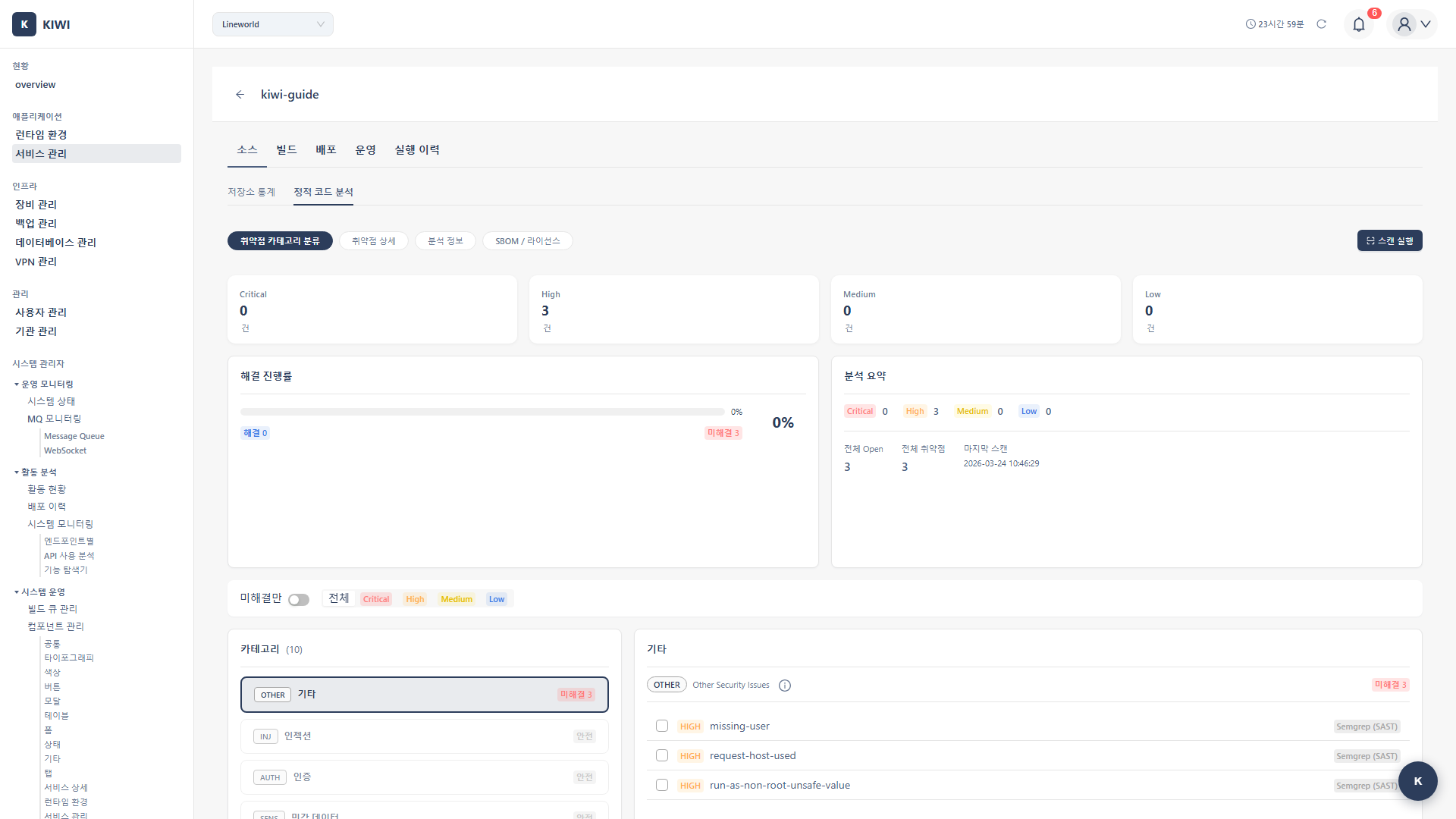
Security analysis provided in each pipeline stage:
-
Source stage (Static Code Analysis): Statically analyzes source code to detect security vulnerabilities. Click the Source stage, then select the SAST tab.
-
Build stage (Image Analysis): Analyzes vulnerabilities in built container images and dependencies. Click the Build stage, then select the SCA/SBOM tab.
-
Operate stage (Domain Analysis): Dynamically detects vulnerabilities by sending HTTP requests to running applications. Click the Operate stage, then select the DAST tab.
Dashboard Integrated View
View security analysis results for all services at a glance from the Security Posture tab on the [Dashboard] page.
Regularly checking the security status of all services on the dashboard allows you to respond quickly when new vulnerabilities are discovered. Make it a habit to immediately check vulnerabilities with Critical or High severity.
Each Analysis Type in Detail
SAST (Static Application Security Testing)
Detects security vulnerabilities by statically analyzing source code without executing it. Finding problems early in development can significantly reduce the cost of fixes.
- CodeQL: GitHub's in-depth data flow analysis. Supports Java, JavaScript, Python, Go, C++, C#, and Ruby.
- Semgrep: Fast pattern-matching-based analysis. Supports 30+ languages.
Key detected vulnerabilities:
- SQL Injection (CWE-89): Code where malicious SQL queries can be inserted .
- Cross-Site Scripting, XSS (CWE-79): Vulnerability where malicious scripts can be injected into web pages .
- Command Injection (CWE-78): Code where OS commands can be injected .
- Hardcoded Credentials (CWE-798): Passwords or API keys hardcoded in source code .
- Path Traversal (CWE-22): Vulnerability allowing access to unintended files through path manipulation .
SCA (Software Composition Analysis)
Detects known vulnerabilities (CVEs) in built container images and dependency packages. This analysis is crucial because modern software depends on numerous external libraries.
- OS packages: Alpine, Debian, Ubuntu system packages .
- Language packages: npm, pip, maven, go packages .
- Base images: Base image vulnerabilities from the FROM clause .
Automatically filters out vulnerabilities with no real impact (false positives) to reduce unnecessary alerts. This feature helps you focus on the vulnerabilities that truly matter.
SBOM (Software Bill of Materials)
Generates a list of all components that make up the software. This is an essential document that forms the foundation of supply chain security.
- CycloneDX: OWASP standard, focused on security analysis .
- SPDX: Linux Foundation standard, focused on license management .
Use cases:
- Supply Chain Security: Transparently manage what components are included .
- License compliance: Understand open source licenses in use
- Vulnerability tracking and response: Quickly identify affected services when new CVEs are announced .
DAST (Dynamic Application Security Testing)
Dynamically detects vulnerabilities by sending real HTTP requests to a running application. It can find runtime vulnerabilities that are difficult to discover with SAST.
- Baseline: Fast passive scan. Recommended for development and CI environments. (5-10 minutes)
- Full: Complete active scan. Recommended for staging environments. (30 min - 2 hours)
- API: API-specific scan. Recommended for REST API services. (15-30 minutes)
Key detected vulnerabilities:
- Missing Security Headers: Missing HTTP security headers .
- Cookie Security Issues: Missing Secure or HttpOnly flags on cookies .
- CSRF Vulnerabilities: Cross-Site Request Forgery vulnerabilities .
- SQL Injection (runtime): SQL injection confirmed through actual requests .
- XSS (runtime): Cross-Site Scripting confirmed through actual requests .
Severity Classification and Response Guide
CVSS-Based Severity
CVSS (Common Vulnerability Scoring System) is a scoring system that standardizes vulnerability severity on a scale of 0-10.
-
Critical (CVSS 9.0-10.0): Requires immediate response. Block deployment and apply emergency fix right away.
-
High (CVSS 7.0-8.9): Requires response within 24-48 hours. Prioritize fixing these vulnerabilities.
-
Medium (CVSS 4.0-6.9): Requires response within 1-2 weeks. Plan fixes in upcoming sprints.
-
Low (CVSS 0.1-3.9): Can be addressed in the next release. Monitor and fix when convenient.
-
Info (N/A): Optional response. Use as reference information.
When Critical or High severity vulnerabilities are discovered, immediate action is required. Especially in production environments, there is a risk of these vulnerabilities being exploited, so prepare quick patches or temporary workarounds.
Recommended Policies by Environment
-
Development: SAST is optional, SCA is recommended, SBOM and DAST are optional. Use alert-only blocking policy to avoid disrupting development flow.
-
Staging: SAST, SBOM, and DAST are recommended, SCA is required. Block deployments with High severity or above to catch issues before production.
-
Production: All security analyses (SAST, SCA, SBOM, DAST) are required. Block deployments with Critical severity to protect production systems.
Quick Start: Full Security Analysis Flow
If this is your first time, follow these steps to experience the full security analysis.
Step 1: SAST Scan (Source Stage)
- Select a service from the [Service Management] page
- Click the Source stage
- Click Start Scan in the SAST tab
- Select the analysis engine (CodeQL/Semgrep/Both)
- Review results and fix discovered vulnerabilities .
Step 2: SCA/SBOM Scan (Build Stage)
- Click the Build stage
- Click Start Scan in the SCA tab
- Enable VEX Hub filtering (recommended)
- Check vulnerabilities and update packages .
- Generate the component list in the SBOM tab
Step 3: DAST Scan (Operate Stage)
- Confirm service deployment is complete .
- Click the Operate stage
- Verify the target URL in the DAST tab
- Select scan type (Baseline/Full/API)
- Click Start Scan
- Check and fix runtime vulnerabilities .
If you're new to DAST, start with a Baseline scan. It provides quick results and can detect most common vulnerabilities. Full scans take longer and can put load on the service, so it's recommended to run them in staging environments.
Integrating Security Analysis with Auto CI
You can automate security analysis in Auto CI Settings. This eliminates the hassle of running scans manually each time - security checks happen automatically when code changes.
Automatic Scan Triggers
- Push: SAST and SCA run automatically; DAST is optional.
- Merge Request: SAST and SCA run automatically after build; DAST is optional.
- Deployment complete: DAST runs automatically.
Configuring Blocking Policies
Setting severity-based blocking policies in Auto CI will automatically block deployment when vulnerabilities are found. This prevents code with security issues from being deployed to production.
Utilizing Security Analysis Results
Generating PDF Reports
Click the Download PDF button on each analysis result screen to generate a detailed security report. These reports can be used for security audits or compliance documentation.
- SAST report: Code vulnerabilities, location, CWE mapping .
- SCA report: CVE list, affected packages, fixed versions .
- SBOM report: Full component list, license information .
- DAST report: Runtime vulnerabilities, request/response evidence .
Dashboard Integration
The Security Posture tab on the [Dashboard] page shows:
- Vulnerability status summary for all services .
- Distribution chart by severity .
- Recent scan history
- Trend analysis
Troubleshooting
Common Issues
-
Cannot start scan: Git token permissions may be insufficient. Renew your Access Token and verify it has the necessary permissions.
-
Timeout: Large repositories or images may take longer to analyze. Reduce the analysis scope or increase the timeout setting.
-
Empty results: The language or format may not be supported. Check the list of supported languages for each analysis tool.
Troubleshooting by Analysis Type
For detailed troubleshooting guides for each analysis type, refer to the individual documents:
Security Analysis Best Practices
Shift-Left Security
"Shift-Left" means moving security checks earlier (to the left) in the development process. The earlier problems are found, the lower the cost of fixing them.
- Run SAST from the beginning of development: Finding vulnerabilities at the time of coding makes fixes easier .
- Check SCA when adding dependencies: Verify there are no known vulnerabilities before introducing new packages .
- Integrate security analysis in PRs/MRs: Create a culture of reviewing security results during code review
Vulnerability Management
- Prioritize Critical/High: If resources are limited, resolve severe vulnerabilities first
- Manage false positives: Use VEX filters and add confirmed false positives to ignore lists .
- Regular rescans: New CVEs are constantly discovered, so rescan regularly .
- Update base images: Keep container base images up to date .
Compliance
- Generate and store SBOM: Generate and retain SBOM to meet supply chain security requirements .
- Review licenses: Verify that open source licenses in use match project policies .
- Audit logs: Track security scan history to prepare for audits .
Related Features
- Service Build/Deploy - Security analysis integrated pipeline
- Operations Management - Real-time security monitoring .
- Auto CI Setup - Automated security analysis settings .