K8s Certificate Renewal
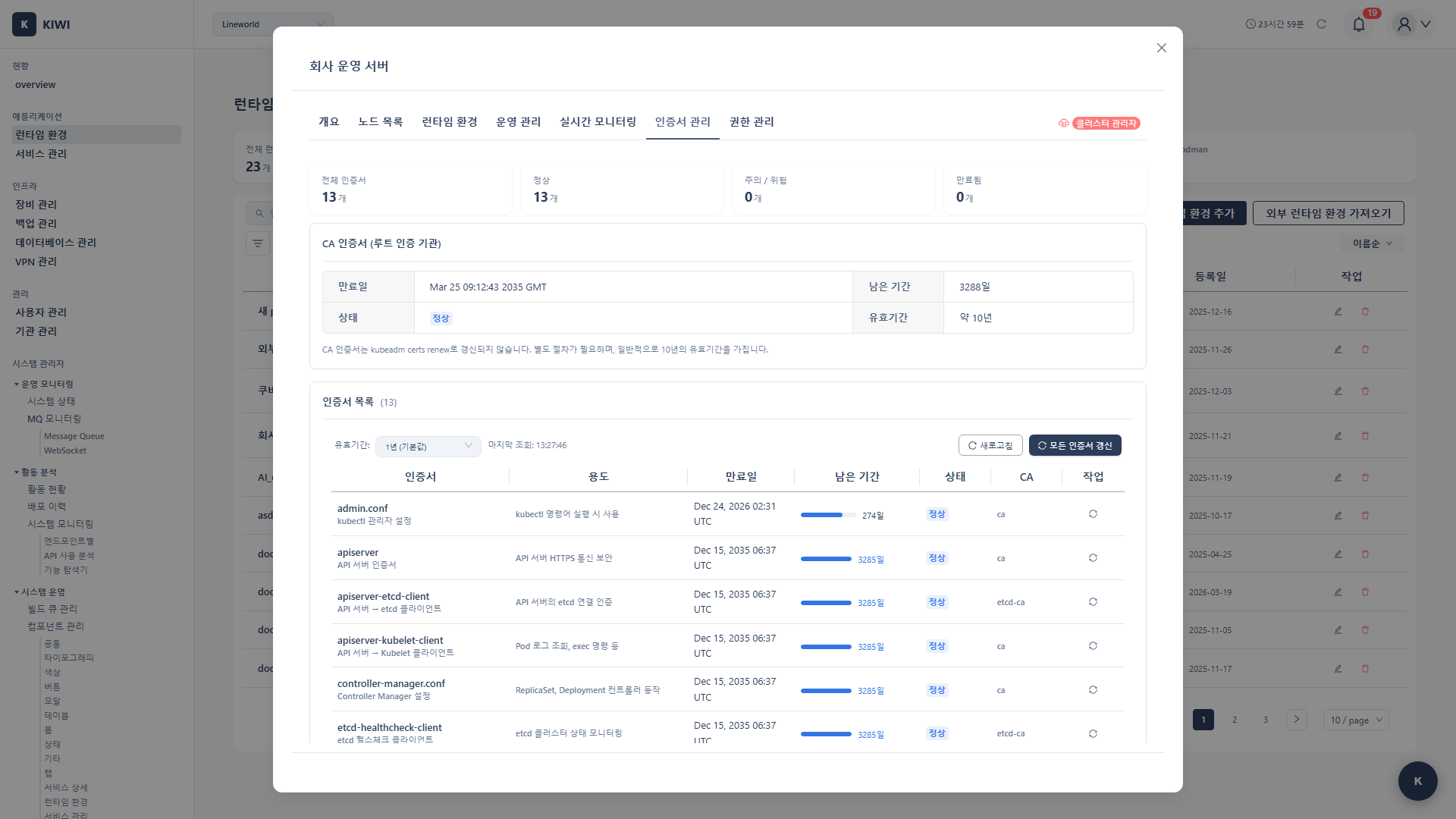
When Kubernetes cluster certificates expire, the entire cluster can stop working. With KIWI, you can receive alerts before certificates expire and renew them with a simple click.
When certificates expire, kubectl commands fail, Pod scheduling stops, and in the worst case, you lose access to the entire cluster. Regular certificate management is essential.
Certificate Overview
Kubernetes clusters use various types of certificates for secure communication between components.
Key Certificates
- CA Certificate (Valid for 10 years): The root certificate authority certificate for the cluster. Used to sign all other certificates, making it the most important with a long 10-year validity period.
- API Server Certificate (Valid for 1 year): Used for TLS communication with the API server. When expired, kubectl commands and all API calls fail.
- Controller Manager Certificate (Valid for 1 year): Used when the controller manager communicates with the API server. When expired, controllers like Deployment and ReplicaSet stop working.
- Scheduler Certificate (Valid for 1 year): Used when the scheduler communicates with the API server. When expired, new Pods cannot be scheduled to nodes.
- Kubelet Certificate (Valid for 1 year): Used when each node's kubelet communicates with the master. When expired, that node enters NotReady state.
- etcd Certificate (Valid for 1 year): Used for communication between nodes in the etcd cluster. When expired, cluster data becomes inaccessible and the entire cluster is disabled.
Impact of Certificate Expiration
The impact varies by certificate type. If all certificates expire, the cluster is completely paralyzed.
- API Server: kubectl commands fail and all management operations become impossible. (Critical)
- Kubelet: Node-master communication failure and Pod scheduling becomes impossible. (Severe)
- etcd: Cluster data becomes inaccessible. (Critical)
It's best to plan renewal 30 days before certificates expire. Use KIWI's alert feature.
Prerequisites
- A Kubernetes cluster must be registered in KIWI
- SSH access to cluster master node is required.
Permission Notice: If you cannot access this feature, please request permission from your organization manager.
Check Certificate Status
Step 1: Navigate to Runtime Environment Page
- Select the target cluster from the [Runtime Environment] page
- Navigate to the cluster detail page
Step 2: Check Certificate Tab
- Click the Certificates tab
- The expiration status of all certificates is displayed.
Certificate Status Display
- Normal (Green): Certificate expires in more than 30 days. No special action needed, but monitor the status regularly.
- Warning (Yellow): Certificate expires within 30 days. Plan renewal schedule and reserve a maintenance window.
- Critical (Red): Certificate expires within 7 days. Perform renewal work immediately. If ignored, cluster failure will occur.
- Expired (Red): Certificate has already expired. There is impact on cluster functionality, so perform emergency renewal.
Certificate Details
You can view detailed information by clicking each certificate:
- Issue Date: Certificate issue date.
- Expiration Date: Certificate expiration date.
- Remaining Time: Days until expiration.
- Subject: Certificate subject
- Issuer: Certificate issuer
Certificate Renewal
Automatic Renewal (Recommended)
Renew all certificates at once through KIWI.
Step 1: Start Renewal
- Click the Renew Certificates button in the Certificates tab
- A renewal confirmation dialog appears.
Step 2: Review Renewal Options
- All Certificates (Selected by default): Renews all cluster certificates at once. Using this option is safe and convenient for most cases.
- Selective Renewal: Renews only selected certificates. Use only when there's a specific reason. Renewing only some certificates may cause version mismatch issues.
- Component Restart (Enabled by default): Automatically restarts related components (kubelet, API server, etc.) after certificate renewal. If disabled, you must manually restart for new certificates to take effect.
Step 3: Execute Renewal
- Click the Renew button.
- KIWI connects to the master node via SSH
- Renewal progress is displayed:
- Backup existing certificates
- Generate new certificates
- Restart components
- Verify connection
Step 4: Verify Renewal Completion
- Confirm "Certificates have been renewed" message
- Check new expiration dates in the certificate list
- Verify cluster connection status.
Selective Renewal
When renewing only specific certificates:
- Select Selective Renewal option.
- Check the certificates to renew
- Execute Renew
Post-Renewal Verification
Check Cluster Status
Verify the following after renewal:
- Node Status: All nodes in Ready state.
- Pod Status: System Pods running normally.
- API Access: kubectl commands working normally.
Verify in KIWI
- Check cluster status on Runtime Environment page
- Verify new expiration dates in Certificates tab
- Test service deployment/operations functions.
Manual Renewal
When KIWI automatic renewal fails or manual renewal is needed:
kubeadm Cluster
Run via SSH on the master node:
# Check certificate expiration
kubeadm certs check-expiration

# Renew all certificates
kubeadm certs renew all

# Restart components
systemctl restart kubelet

# Restart control plane Pods (when using static pods)
# Moving pod manifest files temporarily triggers automatic restart
Individual Certificate Renewal
# Renew specific certificates only
kubeadm certs renew apiserver
kubeadm certs renew apiserver-kubelet-client
kubeadm certs renew front-proxy-client
kubeconfig File Renewal
# Renew admin.conf
kubeadm certs renew admin.conf

# Renew other kubeconfigs
kubeadm certs renew controller-manager.conf
kubeadm certs renew scheduler.conf
Troubleshooting
Renewal Failure
- When SSH connection fails: KIWI cannot SSH to the master node. Verify SSH connection information (host, port, user, password or SSH key) in Runtime Environment settings and check firewall settings.
- When permission error occurs: The SSH user lacks sudo permissions for certificate renewal. Verify that the user can execute
kubeadm certs renewcommand with sudo. - When kubeadm cannot be found: The cluster was not installed with kubeadm. Follow manual renewal procedures or refer to cluster installation documentation.
Post-Renewal Issues
- When API connection fails: Certificates were renewed but components weren't restarted, so old certificates are still in use. Run
systemctl restart kubeleton the master node and verify control plane Pods have restarted. - When node is in NotReady state: That node's kubelet failed to load new certificates. SSH to the problematic node and run
systemctl restart kubelet. - When etcd connection fails: Cannot access data store due to etcd certificate issue. Restart etcd Pod or verify etcd certificates were renewed correctly.
Emergency Recovery
When cluster access is impossible due to certificate expiration:
- SSH directly to master node.
- Manually renew certificates.
- Restart components
- Reconnect cluster in KIWI
Automatic Alert Settings
Configure alerts for certificate expiration.
Alert Settings
- Navigate to Runtime Environment > Settings tab
- In Alert Settings section:
- Certificate Expiration Alert: Enable.
- Alert Timing: 30 days / 14 days / 7 days before
- Alert Method: Email / Slack.
Recommended Alert Schedule
- 30 days before: Establish a renewal plan. Assign responsible personnel and proceed with preparations needed for renewal work (etcd backup, test environment verification, etc.).
- 14 days before: Schedule specific renewal work dates. Choose a maintenance window that minimizes service impact and notify related teams.
- 7 days before: If not yet renewed, perform renewal work immediately. Risk of unexpected cluster failure increases after this point.
Best Practices
Proven recommendations for certificate management.
Preventive Management
Regularly checking these items can prevent outages due to certificate expiration.
- Regular Checks: Review certificate status monthly.
- Alert Settings: Set alerts for 30, 14, and 7 days before expiration.
- Documentation: Record renewal history and responsible parties.
- Testing: Test renewal procedures in a test environment first
Renewal Planning
Renewal should be done systematically.
- Maintenance Window: Choose low-traffic times (early morning, etc.)
- Backup: Always backup etcd before renewal.
- Rollback Plan: Prepare recovery procedures in case of failure
- Verification: Test that all components work normally after renewal.
Security Considerations
Certificates are core to cluster security.
- CA Protection: Store CA certificates and keys in a secure location.
- Key Rotation: Regularly renew certificates to maintain security.
- Access Restriction: Minimize access permissions to certificate files.
- Audit: Log all certificate-related operations.
If the CA certificate is compromised, the entire cluster is at risk. Manage CA certificates with extra care.
Related Guides
- Runtime Environment Registration - Register K8s cluster.
- K8s RBAC Management - ServiceAccount management.
- Backup Restoration - Cluster recovery.