Service Registration
Register services in the KIWI platform to manage builds and deployments. KIWI supports three source types: GitLab, GitHub, and Docker Hub, with different registration procedures for each.
Why Register a Service?
When you register a service, you can automate the following DevSecOps workflow:
Code Push → Auto Build → Security Scan → Test → Deploy
- Automatic builds when code changes by integrating with Git repositories.
- Automatic security vulnerability analysis with SAST, SCA, DAST
- Deploy to Kubernetes or Docker with a single click.
DevSecOps is an approach that integrates Development, Security, and Operations. By considering security from the early stages of development, you can deliver more secure software faster.
Prerequisites
The following conditions must be met before registering a service:
- Depending on the source type:
- GitLab: GitLab repository URL and access permissions.
- GitHub: GitHub Personal Access Token (PAT)
- Docker Hub: Image name to use (no authentication needed for public images; Docker Hub Access Token required for private images)
- The runtime (K8s cluster or Docker) to deploy the service to must already be registered.
You need to register a runtime before registering a service:
Registration Procedure
Step 1: Navigate to Service Management Page
- Click [Service Management] page in the left menu
- Click the Add button in the upper right corner.
Step 2: Select Source Type
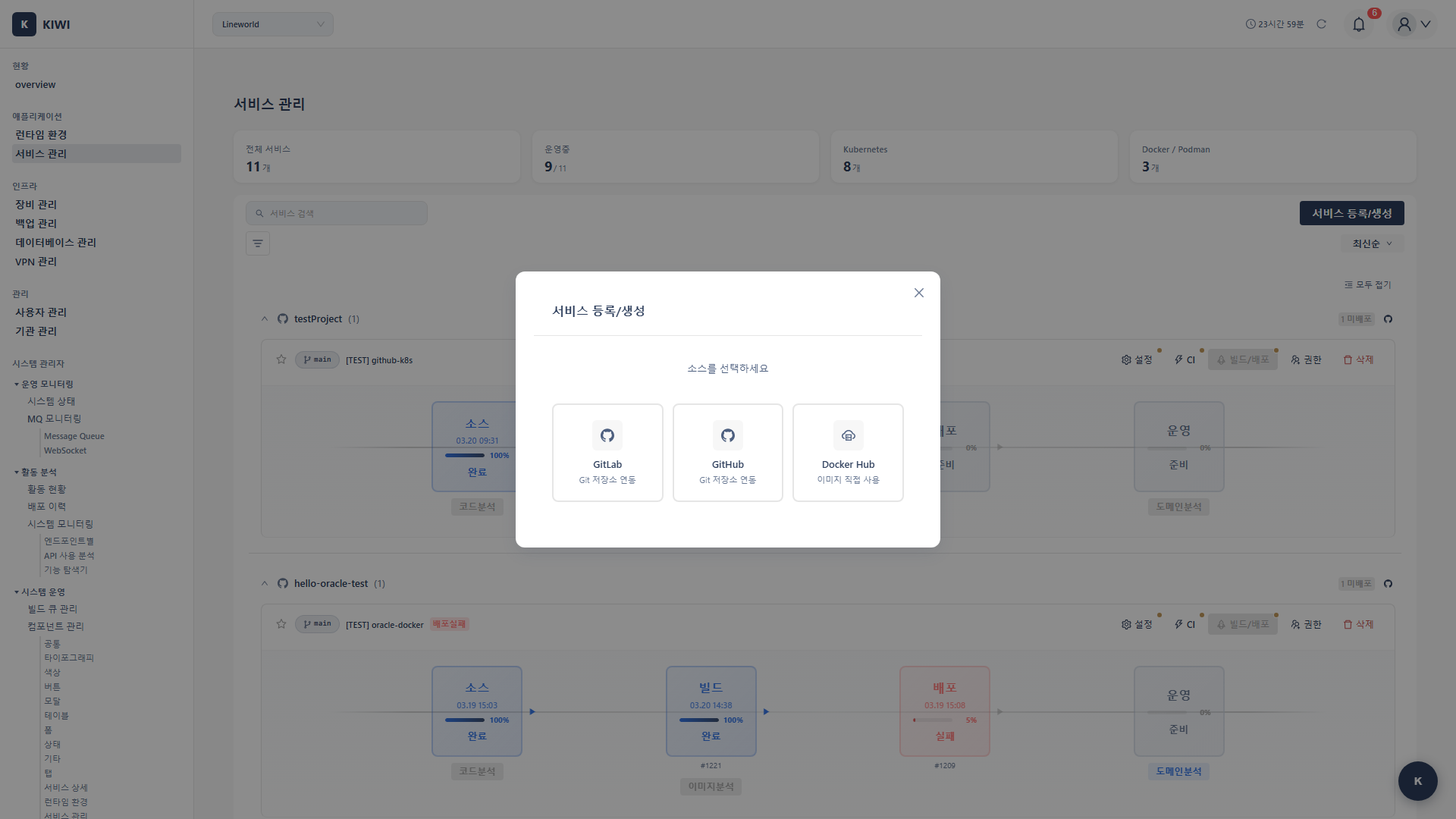
When the service registration modal opens, select a source type:
- GitLab: Register a GitLab repository project. Supports registering existing projects, creating new projects, and direct URL input.
- GitHub: Register a GitHub repository. Authenticate with a Personal Access Token and select from your repository list.
- Docker Hub: Deploy public or private Docker Hub images directly. Use pre-built images without building source code.
- If you have your own source code → GitLab or GitHub (choose where your code is hosted)
- If you want to deploy a pre-built image → Docker Hub (public images like MySQL, Redis, or your own pre-built images)
GitLab Service Registration
Choose Registration Method
After selecting GitLab, choose one of these methods:
- Register Existing Project: Connect an existing GitLab project to KIWI
- Create New Project: Create a new project on GitLab and register it in KIWI
- URL Settings: Enter a Git repository URL directly.
Enter Basic Information
- Service Name (Required): A unique name to identify the service. Recommended to use lowercase letters, numbers, and hyphens only.
- Git URL (Required): The repository address (e.g.,
https://gitlab.com/org/repo.git) - Branch (Required): The default branch for builds (e.g.,
main,develop) - Auth Token: GitLab Personal Access Token (
glpat-xxxx...) for private repositories.
When creating a token at GitLab → Settings → Access Tokens, select the following permissions:
api(Required): Needed for KIWI's full features (build, deploy, Auto CI, project creation, etc.)read_repository(Required): Needed to fetch source code for buildsread_api(Required for Auto CI): Needed for Webhook-based automatic builds
GitHub Service Registration
Step 1: Connect GitHub
- Personal Access Token (Required): Enter a PAT generated from GitHub (
ghp_xxxx...)- Generate at GitHub → Settings → Developer settings → Personal access tokens.
- Requires
reposcope permission.
- Enter the PAT and click the Connect button to fetch your repository list
Step 2: Select Repository
- Select the repository to register from your connected GitHub account's repository list
- Branch list is automatically fetched upon selection.
Step 3: Enter Branch and Service Name
- Branch (Required): Select the branch to use for builds.
- Service Name (Required): Enter the service name to use in KIWI
Step 4: Complete Registration
Click the Register button to register the GitHub repository as a KIWI service.
Docker Hub Service Registration
Docker Hub service registration is used to directly deploy pre-built Docker images without source code builds.
Step 1: Select Deployment Infrastructure
- Deployment Infrastructure (Required): Select the runtime to deploy images to (K8s or Docker)
- Service Name (Required): Enter the service name
Step 2: Configure Images
A single service can include multiple container images. Enter the following for each image:
- Container Name (Required): A name to identify the container (e.g.,
web,db) - Image (Required): Docker Hub image name. Use the search feature to find public images or enter directly.
- Official images:
mysql,nginx,redis,postgres - User images:
username/repo
- Official images:
- Tag (Required): Image version. Available tags are automatically fetched (e.g.,
latest,8.0,alpine) - Port (Optional): Port number the container uses.
- Environment Variables (Optional): Environment variables to pass to the container (key-value format)
- Volume (Optional): Persistent storage mount configuration (mount path, size)
You can configure a web application + database as a single service:
- Image 1:
nginx:alpine(web server, port 80) - Image 2:
mysql:8.0(database, port 3306, volume/var/lib/mysql)
Step 3: Docker Hub Authentication (Optional)
Only enter authentication info when using images from private repositories:
- Username: Docker Hub username
- Access Token: Docker Hub Access Token
Authentication is not needed for public images (mysql, nginx, etc.).
Step 4: Complete Registration
Click the Register button to register the Docker Hub service. Docker Hub services can be deployed directly without a build step.
Feature Comparison by Source Type
-
GitLab/GitHub (Git Sources)
- Source code builds (Dockerfile or Build Wizard)
- Auto CI (automatic builds on Git Push)
- Security scanning (SAST, SCA, DAST)
- Deploy built images to K8s/Docker.
-
Docker Hub (Image Source)
- Deploy images directly without builds.
- Multi-container configuration possible
- Support for both public and private images.
- Deploy to K8s/Docker
Features Available After Registration
Once service registration is complete, the following features are available:
-
Manual build: Immediately build a Docker image with a button click.
-
Auto CI: Automatically run a build when a Git Push event occurs.
- Detects code pushes through webhooks.
- Builds are triggered only when pushing to the configured branch
-
Build Wizard: Automatically generate a Dockerfile for projects without one
- Supports various languages/frameworks including Node.js, Python, Java, Go
-
Security scan: Run various security analyses including SAST, SCA, and DAST
- Code vulnerability analysis (SAST)
- Open source library vulnerability analysis (SCA)
- Running application vulnerability analysis (DAST)
-
Deployment: Deploy the built image to a Kubernetes or Docker environment.
- Zero-downtime deployment (Rolling Update) support
- Deployment history management and rollback capabilities.
Next Steps
Service registration is complete! Now it's time to build your CI/CD pipeline:
- Auto CI Setup - Configure automatic builds on Git Push
- Build Wizard - Automatic Dockerfile generation.
- Security Scan Setup - Configure SAST/SCA/DAST analysis.