K8s RBAC Management
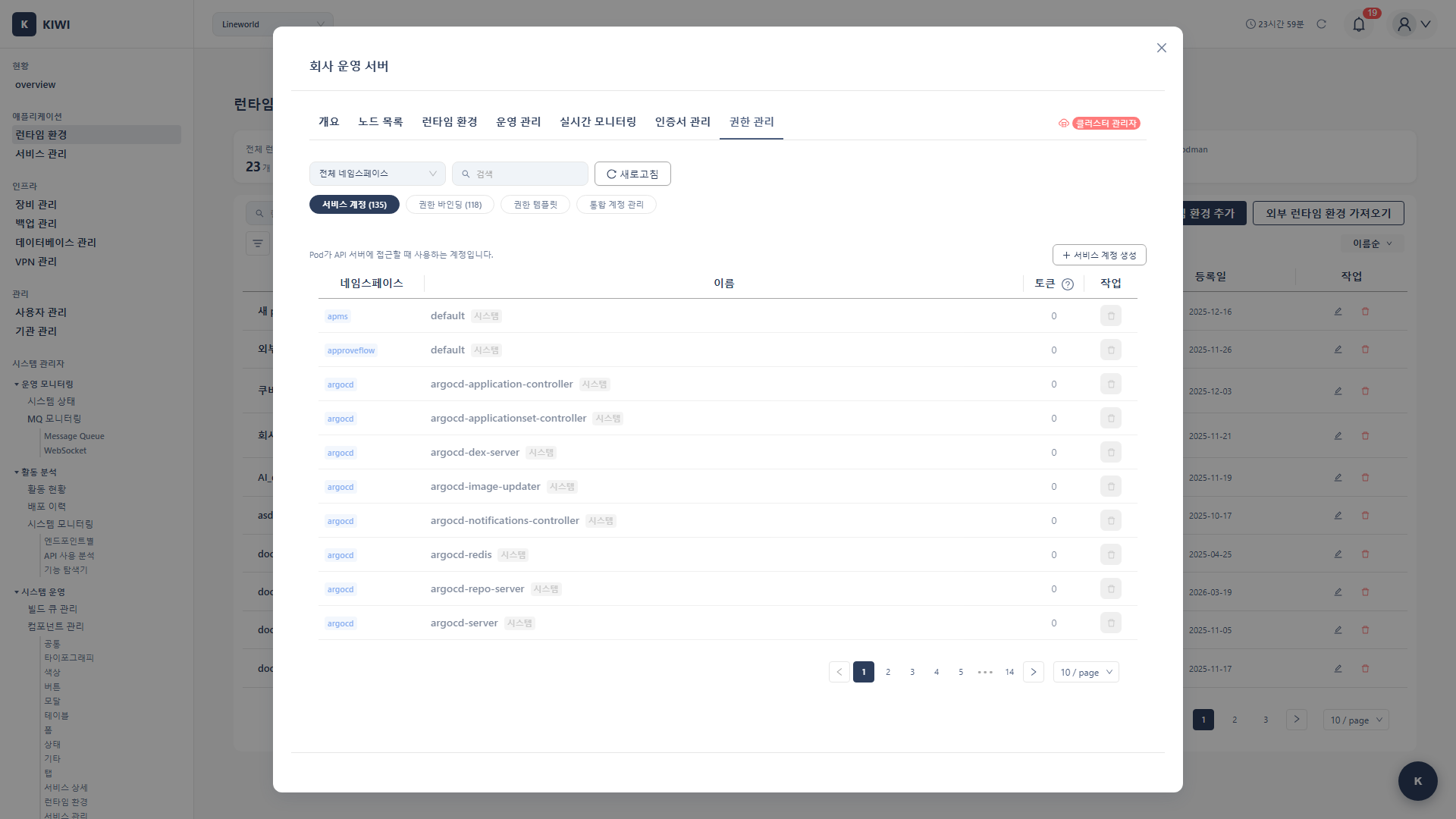
"Want the dev team to only access the dev namespace, and the ops team to only access the prod namespace?" KIWI's RBAC management feature lets you finely control Kubernetes cluster access by team and role.
Giving all users full cluster access increases the risk of accidents causing outages. RBAC helps you grant "only the permissions needed to those who need them," improving security and stability.
What is RBAC?
RBAC (Role-Based Access Control) is how Kubernetes defines "who can do what." Think of it like a company's access card system. Just as each employee can only access their department and necessary spaces, RBAC ensures users can only access the resources they need.
KIWI's RBAC Structure
- KIWI ServiceAccount: A K8s ServiceAccount managed by KIWI. It serves as an identity for accessing resources within the cluster.
- Namespace Binding: Grants permissions for specific namespaces to a ServiceAccount. Multiple namespaces can be bound to a single SA.
- User Assignment: Assigns a ServiceAccount to KIWI users. Assigned users access the cluster with the SA's permissions.
- Permission Inheritance: Users inherit all namespace permissions from their assigned ServiceAccount.
Permission Levels
KIWI supports three permission levels. Grant only the minimum permissions needed.
- admin: Can manage all resources within the namespace. Suitable for operations teams or administrators.
- edit: Can create/modify/delete resources but cannot change RBAC settings. Suitable for development teams.
- view: Read-only access only. Suitable for monitoring or auditing purposes.
For security, follow the "principle of least privilege." Granting users only the minimum permissions they need minimizes damage from mistakes or malicious actions.
Prerequisites
- A Kubernetes cluster must be registered in KIWI
- Administrator access to the cluster is needed.
Permission Notice: If you cannot access this feature, please request permission from your organization manager.
ServiceAccount Management
Step 1: Navigate to RBAC Management Tab
- Click [Runtime Environment] in the left menu
- Select the target Kubernetes cluster.
- Click the RBAC tab on the cluster detail page
Step 2: Create ServiceAccount
- Click the Add ServiceAccount button.
- Enter SA information:
- Name: ServiceAccount name (e.g.,
developer-sa) - Description: SA purpose description (e.g.,
SA for development team access)
- Name: ServiceAccount name (e.g.,
- Click the Create button.
The created SA will be created in kube-system or the specified namespace.
Step 3: Add Namespace Binding
Grant specific namespace permissions to the SA.
- Click the Add Binding button on the created SA row
- Configure binding information:
- Namespace: Select namespace to grant permissions.
- Role: Select admin / edit / view
- Click the Add button.
Multiple bindings can be configured by repeating for different namespaces.
Step 4: Sync to Cluster
- Click the Sync to Cluster button.
- KIWI creates the following resources in the K8s cluster:
- ServiceAccount
- RoleBinding (for each namespace)
- Confirm the sync completion message
Assign SA to Users
Step 1: Navigate to SA Assignment Tab
- Go to the User Assignment section in the RBAC tab
- Or click the SA Assignment Management button.
Step 2: Select User and Assign SA
- Search for the user to assign
- Click the Assign SA button on the user row
- Select the ServiceAccount to assign
- Click the Assign button.
Step 3: Verify Assignment
Once assignment is complete:
- The user can access namespaces bound to the SA
- Resources in those namespaces are displayed in the user's KIWI UI
SA Token Generation
Generate tokens for use with external tools or CI/CD.
Step 1: Generate Token
- Select the target SA from the SA list
- Click the Generate Token button.
- Set token options:
- Expiration Period: Token validity period (e.g., 30 days, 90 days, 1 year)
- Click the Generate button.
Step 2: Copy Token
- The generated token is displayed.
- Copy the token to clipboard using the Copy button.
Note: The token is only displayed once upon generation. Store it in a secure location.
Step 3: Use Token
Example of using kubectl with the generated token:
kubectl --token=<generated-token> --server=<cluster-api-server> get pods -n <namespace>
Check My K8s Permissions
Users can check their assigned K8s permissions.
How to Check
- Click the Profile icon in the upper right corner.
- Click My K8s Permissions or K8s Access Permissions menu
- The assigned SA and accessible namespace list is displayed.
Displayed Information
- Cluster: Shows the list of accessible K8s clusters. All clusters where you have permissions are listed.
- ServiceAccount: Shows the ServiceAccount name assigned in each cluster.
- Namespaces: List of namespaces accessible through the SA. All bound namespaces are listed.
- Role: Shows the permission level (admin/edit/view) for each namespace.
SA Management Tasks
Modify ServiceAccount
- Click the target SA from the SA list
- Click the Edit button.
- Modify description or bindings.
- Click Save, then click Sync to Cluster
Remove Namespace Binding
- Check the binding list in SA details.
- Click the Delete button next to the binding to remove.
- Click Sync to Cluster
Unassign User SA
- Find the target user in the user assignment list
- Click the Unassign button.
- Click Unassign in the confirmation dialog
Delete ServiceAccount
- Select the target SA from the SA list
- Click the Delete button.
- Click Delete in the confirmation dialog
- The SA and related RoleBindings are deleted from the K8s cluster.
Caution: Deleting an SA immediately removes access permissions for users using that SA.
Import SA from Cluster
You can import existing ServiceAccounts from the cluster into KIWI.
Step 1: Start Import
- Click the Import from Cluster button in the RBAC tab
- KIWI queries the cluster's SA list
Step 2: Select SA
- Select SAs to import using checkboxes.
- Existing RoleBinding information is also displayed.
- Click the Import button.
Step 3: Manage in KIWI
Imported SAs are managed in KIWI:
- Add/remove bindings
- Assign users
- Generate tokens
Practical Use Scenarios
Scenario 1: Grant Namespace Access to Development Team
Situation: Grant edit permission for dev namespace to 3 development team members.
Steps:
- Create SA:
dev-team-sa - Namespace binding:
dev→editrole. - Sync to cluster.
- Assign SA to 3 development team users.
Scenario 2: Operations Team Multi-Namespace Management
Situation: Grant management permissions for prod, staging namespaces to operations team
Steps:
- Create SA:
ops-team-sa - Namespace bindings:
prod→adminrole.staging→adminrole.
- Sync to cluster.
- Assign SA to operations team users.
Scenario 3: External Monitoring Tool Integration
Situation: External monitoring tool needs read-only access to the cluster.
Steps:
- Create SA:
monitoring-readonly-sa - Namespace binding: All namespaces →
viewrole. - Sync to cluster.
- Generate SA token
- Configure token in monitoring tool
Troubleshooting
SA Sync Failure
- When permission error occurs: The ServiceAccount used by KIWI lacks permissions to create RBAC resources. Request ClusterRole and RoleBinding creation permissions from the cluster administrator.
- When namespace not found: The namespace you're trying to bind doesn't exist in the cluster. Create the namespace first and try again.
- When connection failure occurs: There's a network connection issue with the cluster. Check the cluster connection status on the Runtime Environment page and reconnect if necessary.
User Cannot Access Resources
- Cause 1: SA not assigned → Check SA assignment.
- Cause 2: No namespace binding → Add binding.
- Cause 3: Not synced → Execute sync to cluster.
Token Not Working
- Expired: Generate new token
- SA deleted: Check SA status.
- Network issue: Verify API server accessibility.
Security Recommendations
Security best practices for operating RBAC safely.
RBAC configuration isn't a one-time setup. Review and update it regularly.
-
Principle of Least Privilege: Grant users only the minimum permissions they need. Don't give extra permissions "just in case."
-
Regular Review: Review SA assignments and bindings quarterly. Clean up permissions that are no longer needed due to departures or project completions.
-
Token Management: Delete unused tokens immediately. Token leaks can lead to security incidents.
-
Audit Log Review: Regularly check RBAC changes. Monitor for any abnormal modifications.
-
Namespace Separation: Separating namespaces by environment (dev, staging, prod) minimizes the impact of mistakes.
Related Guides
- Runtime Environment Registration - Register K8s cluster.
- Permission Management - KIWI permission system.
- User Management - User and role management.